Repository navigation
Use narrow layout in landscape mode mWeb - #97880
Conversation


|
@codex please review |


There was a problem hiding this comment.
💡 Codex Review
Here are some automated review suggestions for this pull request.
Reviewed commit: ab5dd54579
ℹ️ About Codex in GitHub
Codex has been enabled to automatically review pull requests in this repo. Reviews are triggered when you
- Open a pull request for review
- Mark a draft as ready
- Comment "@codex review".
If Codex has suggestions, it will comment; otherwise it will react with 👍.
When you sign up for Codex through ChatGPT, Codex can also answer questions or update the PR, like "@codex address that feedback".
|
@codex please review |
There was a problem hiding this comment.
💡 Codex Review
Here are some automated review suggestions for this pull request.
Reviewed commit: 23ce776bd9
ℹ️ About Codex in GitHub
Codex has been enabled to automatically review pull requests in this repo. Reviews are triggered when you
- Open a pull request for review
- Mark a draft as ready
- Comment "@codex review".
If Codex has suggestions, it will comment; otherwise it will react with 👍.
When you sign up for Codex through ChatGPT, Codex can also answer questions or update the PR, like "@codex address that feedback".
…or-mweb-landscape
…or-mweb-landscape
|
@codex please review |
|
@MelvinBot review, are there any risks of regressions on web or mWeb in portrait mode? This PR should only change layout of mWeb in landscape mode (should use narrow layout now), apart from tablet devices |
There was a problem hiding this comment.
💡 Codex Review
Here are some automated review suggestions for this pull request.
Reviewed commit: 3bb74c245a
ℹ️ About Codex in GitHub
Codex has been enabled to automatically review pull requests in this repo. Reviews are triggered when you
- Open a pull request for review
- Mark a draft as ready
- Comment "@codex review".
If Codex has suggestions, it will comment; otherwise it will react with 👍.
When you sign up for Codex through ChatGPT, Codex can also answer questions or update the PR, like "@codex address that feedback".

|
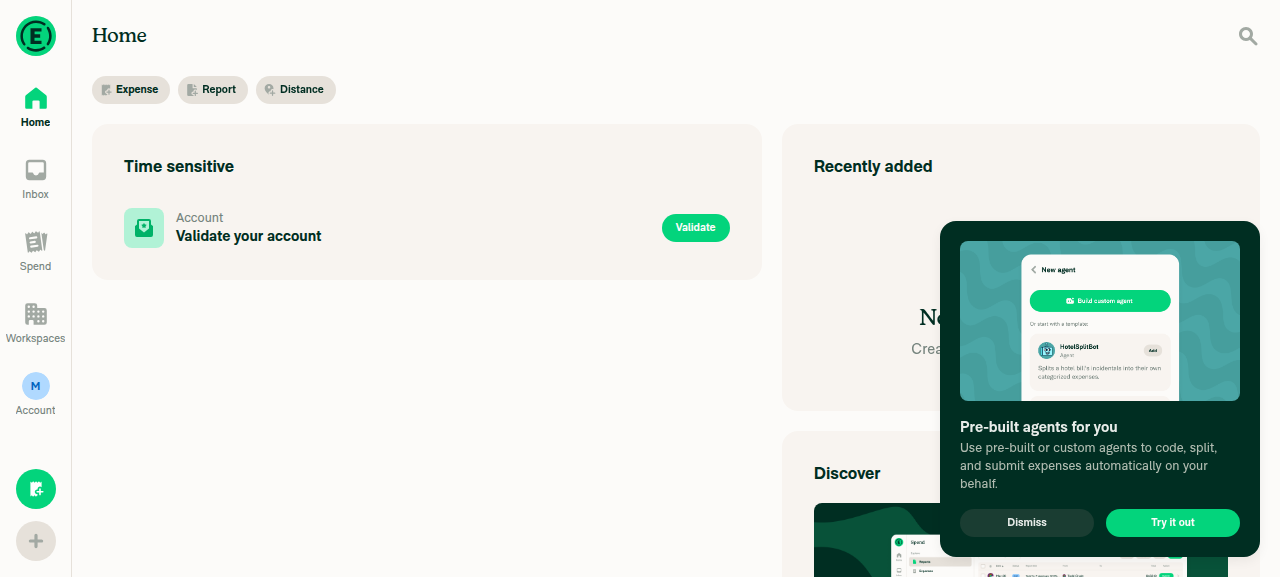
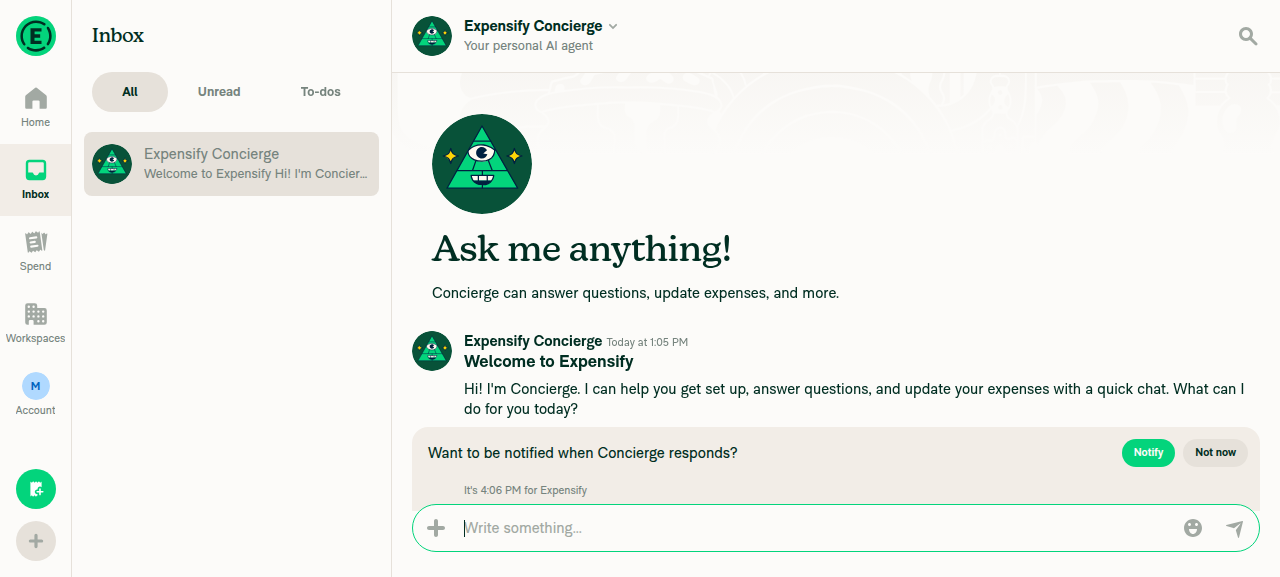
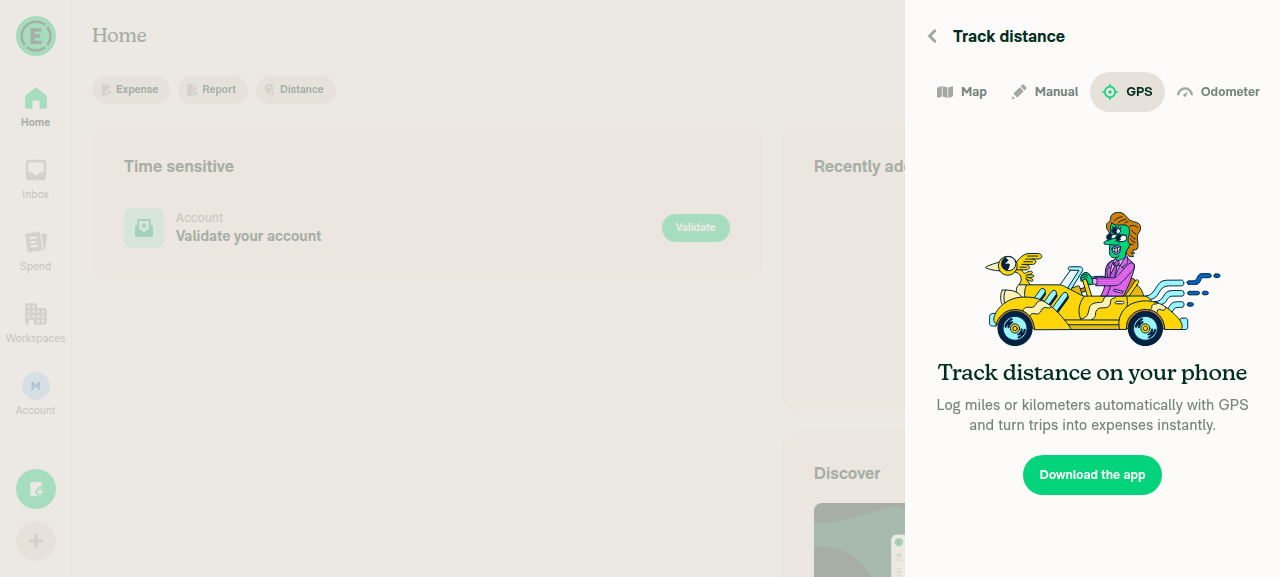
Low regression risk on desktop web and mWeb portrait. The layout switch is correctly gated so that neither desktop web nor mWeb portrait ever sees the new narrow-in-landscape behavior. I did find a few changes that are not gated by orientation and do execute in portrait/desktop — but they resolve to no-ops there. Details and one thing worth a second look below. Why desktop web and portrait are safe Everything hinges on
So all the many I drove desktop web on this branch and confirmed no regression: Home, an open report, the FAB menu, Settings, and the ScrollView-wrapped Distance/GPS step all render the normal wide layout with no clipping/overlap and no visible errors (screenshots below). Non-gated changes that also run in portrait/desktop (verified no-ops there)These are applied outside the landscape gate, so they do execute in portrait/desktop — but each resolves to no visual change because
The one change that genuinely affects desktop web + all orientations: Screenshots (desktop web, this branch) Home screen, wide desktop layoutInbox with report open, three-pane layoutTrack distance GPS step (ScrollView-wrapped), centered and unclippedBottom line: The narrow-layout switch is safely scoped to landscape phone web. The remaining portrait/desktop-facing changes are the safe-area |
…eady in a component
…or-mweb-landscape
|
@codex please review |
There was a problem hiding this comment.
💡 Codex Review
Here are some automated review suggestions for this pull request.
Reviewed commit: 0ab7037dea
ℹ️ About Codex in GitHub
Codex has been enabled to automatically review pull requests in this repo. Reviews are triggered when you
- Open a pull request for review
- Mark a draft as ready
- Comment "@codex review".
If Codex has suggestions, it will comment; otherwise it will react with 👍.
When you sign up for Codex through ChatGPT, Codex can also answer questions or update the PR, like "@codex address that feedback".

|
@codex review |
There was a problem hiding this comment.
💡 Codex Review
Here are some automated review suggestions for this pull request.
Reviewed commit: acf498d7b2
ℹ️ About Codex in GitHub
Codex has been enabled to automatically review pull requests in this repo. Reviews are triggered when you
- Open a pull request for review
- Mark a draft as ready
- Comment "@codex review".
If Codex has suggestions, it will comment; otherwise it will react with 👍.
When you sign up for Codex through ChatGPT, Codex can also answer questions or update the PR, like "@codex address that feedback".
Reviewer Checklist
Screenshots/VideosAndroid: HybridAppAndroid: mWeb ChromeScreen.Recording.2026-09-01.at.16.56.48.moviOS: HybridAppiOS: mWeb SafariScreen.Recording.2026-09-01.at.16.49.42.movMacOS: Chrome / SafariScreen.Recording.2026-09-01.at.16.57.30.mov |

|
@truph01 replied to all your comments, tested on safari mweb and chrome mweb again to check if anything broke |


|
@Expensify/design I have created an ad-hoc build for you, please grill this PR |

|
🚧 mjasikowski has triggered a test Expensify/App build. You can view the workflow run here. |
This comment has been minimized.
This comment has been minimized.

|
Feels pretty good to me, I don't really have any notes! |
|
I mean, this experience is generally rough on mWeb but technically it works. Lots we can do to make it better, like making the top headers scroll with content, etc. But we might want to do that everywhere, not just landscape. |
Yeah this is just the first PR to force narrow layout in mweb landscape, I'll work on follow-ups with improvements for the landscape mode using the ideas you shared in the linked issue |
|
btw @shawnborton
I was trying to do this where headers scroll with content, but only on the main screens (Spend, Workspace, Home) and in the landscape mode for mWeb, is it being worked on globally somewhere? |
|
I don't think anyone is working on it. It's mostly an idea that the @Expensify/design has talked about in passing, but something I think we're all a little interested in - for all mobile devices regardless of orientation. |

|
Yeah this tests well on my end too 👍 |


|
🚧 mjasikowski has triggered a test Expensify/App build. You can view the workflow run here. |

|
✋ This PR was not deployed to staging yet because QA is ongoing. It will be automatically deployed to staging after the next production release. |
|
🧪🧪 Use the links below to test this adhoc build on Android, iOS, and Web. Happy testing! 🧪🧪
|


|
🚀 Deployed to staging by https://github.com/mjasikowski in version: 9.4.73-0 🚀
|
|
🤖 No help site changes are required for this PR. I did not create a docs PR. Why: every change here is internal layout plumbing, not user-facing product behavior:
No feature name, tab name, settings label, button, workflow, or permission changes. The app simply renders its existing narrow layout when a phone browser is rotated, instead of a wide layout. Docs I checkedI searched all of
The help site documents features, settings, and workflows. It never describes how the app arranges columns at a given viewport size, so there is no article to update or add. Adding one would document implementation detail that Expensify's help site deliberately leaves out. @GCyganek — since no docs changes are needed, there is no help site PR to review and no |
|
🚀 Deployed to production by https://github.com/mountiny in version: 9.4.73-3 🚀
Bundle Size Analysis (Sentry): |


Explanation of Change
Enables landscape-aware narrow layout on mWeb, previously native-only.
isInLandscapeModeon web now detects mobile phone browsers (excluding tablets) and derives orientation from viewport width vs. screen dimensions.useResponsiveLayoutfeeds it intoshouldUseNarrowLayout/isSmallScreenWidth, and navigator card styles applyenv(safe-area-inset-*)so content does not overlap landscape notch.useViewportOffsetTopchanges were needed to fixMaximum updates depth exceededcaused byuseSyncExternalStoregetSnapshotvalue not stable during portrait -> landscape change with open keyboard on mWeb Safari iOSFixed Issues
$ #94042
PROPOSAL: N/A
Tests
Portrait <-> Landscape transitions:
Portrait <-> Landscape transitions on Sign In page:
Safe area:
Narrow layout:
Tablets:
When in the landscape mode, focus only on the narrow layout, safe area padding and makes sure it does not crash, as I'm already aware that there are pages that need fixing because they are not scrollable, etc. and it will be fixed in follow-up PRs
Make sure there are no regressions regarding desktop web version of the app.
Offline tests
N/A
QA Steps
Same as tests
PR Author Checklist
### Fixed Issuessection aboveTestssectionOffline stepssectionQA stepssectionAvatar, I verified the components usingAvatarare working as expected)StyleUtils.getBackgroundAndBorderStyle(theme.componentBG))npm run compress-svg)Avataris modified, I verified thatAvataris working as expected in all cases)Designlabel and/or tagged@Expensify/designso the design team can review the changes.mainbranch was merged into this PR after a review, I tested again and verified the outcome was still expected according to theTeststeps.Screenshots/Videos
Android: mWeb Chrome
Screen.Recording.2026-08-25.at.16.47.37.mov
screen-20260824-152404-1787577736754.mp4
iOS: mWeb Safari
Screen.Recording.2026-08-25.at.16.47.15.mov
ios-sign-in-safari-mweb.mp4
ios-safari.mp4
ios-chrome.mp4
MacOS: Chrome / Safari
Screen.Recording.2026-08-25.at.16.49.24.mov